

This guide will show you how to Change World Difficulty on a Necesse Server
Looking for a Necesse game server? Click here to order your server!
As your Necesse server grows and players progress through its world, the starting difficulty might no longer fit your group's playstyle. Whether your players are looking for a relaxed, casual experience focused on base building, or a grueling challenge that tests their combat skills against boss encounters, adjusting the world difficulty allows you to keep the game engaging for everyone. Necesse features multiple distinct difficulty modes: Casual, Adventure, Classic, and Brutal, each drastically altering combat mechanics, enemy health, damage scaling, and boss behavior. Server administrators aren't locked into the difficulty chosen during world creation; you can seamlessly update these settings on an active server at any time. This guide provides a comprehensive walkthrough on how to change world difficulty on your Necesse server. You will learn how to modify difficulty through the server configuration file (server.cfg) as well as how to make instant adjustments on the fly using in-game administrative commands.
Changing the World Difficulty
1. Log in to your Game Control Panel and navigate to your service.
2. Before making any changes, ensure that your server is fully stopped.
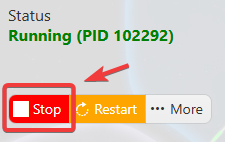
This helps prevent configuration changes from being overwritten or reverted to their default values.
3. Navigate to the Configuration Files tab to access your server’s configuration settings.
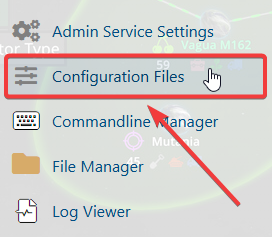
4. In the configuration files, navigate to saves\worlds\Citadel New World\worldSettings.cfg, then select Text Editor to open the file.

5. Locate the difficulty setting within the file and set its value to your preferred level: casual, adventure, classic, hard, or brutal.
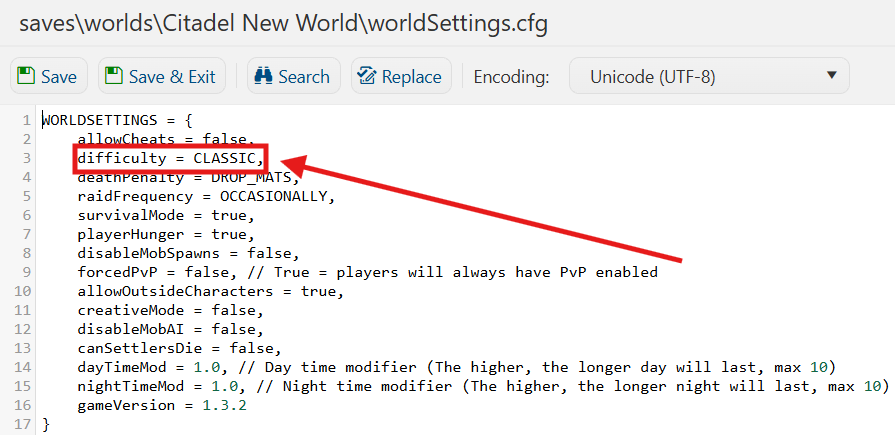
6. Once you have finished editing the settings, click the Save button to apply the changes to your server.